Coloring Book - Games for Kids
- 4.4
- Rating
- 5.00M
- Installs
- Free
- Price
 Analysis by App-foxy
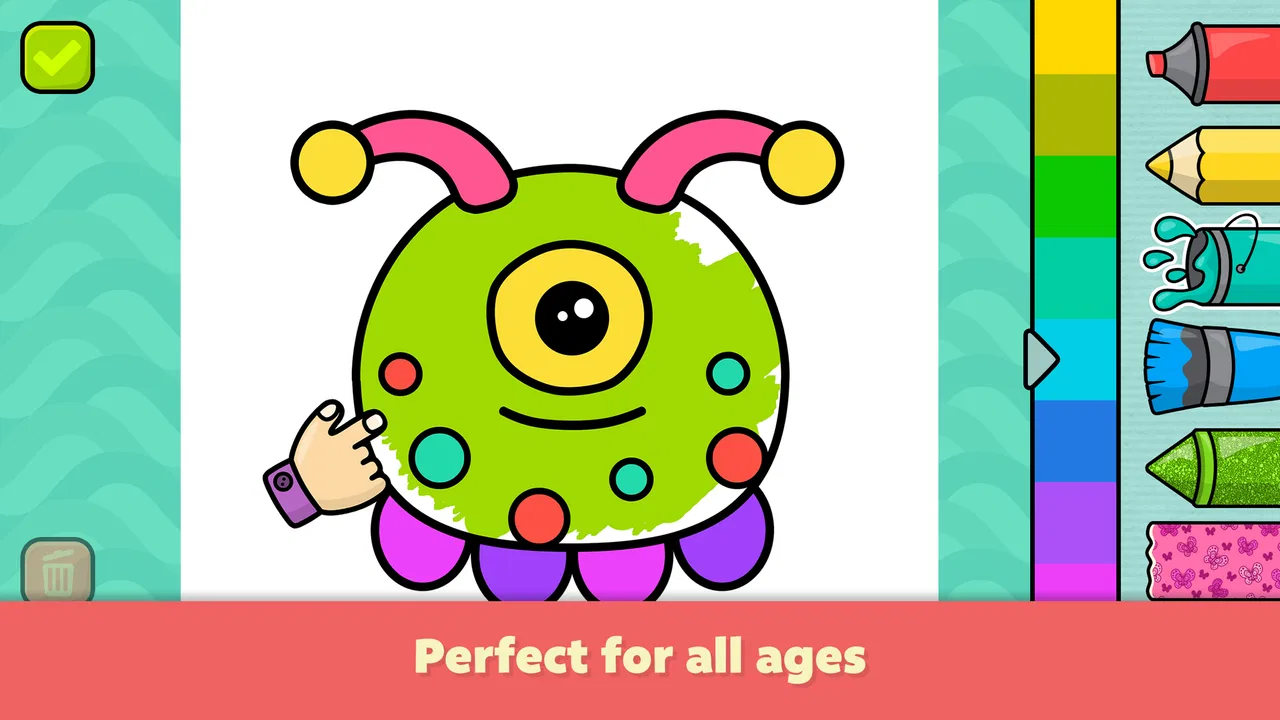
Coloring Book - Games for Kids is the kind of educational game I would keep ready for a quiet moment rather than treat as a complete learning program. It gives young children a simple way to choose a drawing page, add color, and enjoy a result without needing to read much or understand complicated rules. I found that straightforward approach useful for toddlers who want to do something independently, while a parent can still sit nearby and turn the activity into a conversation about colors, animals, objects, or shapes.
The game comes from Bimi Boo Kids Learning Games for Toddlers FZ-LLC and is free to start. It is listed for Everyone, runs on Android 7.0 or later, and has reached more than five million installs. Its average rating is 4.4 from around twenty-eight thousand ratings, which suggests that many families find the basic idea dependable, although popularity alone does not remove the small points of friction that can appear during setup or everyday use.
Getting started without turning coloring time into a technical problem
The first thing I would check is whether the device meets the Android requirement before handing it to a child. The current version is 1.126, and an older phone or tablet may need an operating-system update before installation works properly. That is a simple check, but it matters when a family device has been sitting unused for a while or is shared between several children.
You May Also Like

 Blood Strike: 2.5 Anniversary
Blood Strike’s Loadouts Turn Every Drop Into a Tactical Gamble
A close look at Blood Strike’s custom loadouts: how fast access to signature weapons reshapes its battle royale rhythm, rewards preparation, and narrows the gap between fights.

 Pandora - Music & Podcasts
Pandora’s Music Is Easy to Start, but Harder to Recover
Pandora’s strength is its low-effort path from a seed to a station. Its weak spot is how much confidence it asks you to place in connection, setup, and quiet recovery.

 8 Ball Pool
 Is Built on Rivalries, Rematches, and Routine
A close look at the rivalries, rematches, shared routines, and unanswered safety questions that turn a quick pool match into a persistent mobile community.

 Samsung Music
’s Quiet Strength Is Playing What You Already Own
Its reach comes less from spectacle than from dependable access to a personal library. That simplicity is both the app’s strongest retention engine and its ceiling.

 AccuWeather: Weather Radar
AccuWeather Review: A Quick, Clear Forecast for Everyday Decisions
For everyday plans, the best forecast is the one you can understand quickly. AccuWeather makes rain timing, radar, and local conditions easy to act on, with a few trade-offs.

 Hill Climb Racing
Why Hill Climb Racing Still Turns Crashes Into One More Run
A tiny car, a bumpy hill and one more upgrade: Hill Climb Racing keeps resurfacing because its simple chaos makes every near-miss feel personal.
More From Our News Desk



I also recommend installing and opening the game before a planned activity. This gives you time to see how the drawing pages are arranged, notice which content is immediately available, and understand where any optional purchases appear. The game includes more than one hundred sixty-five pages, so a quick adult preview can make it easier to find a suitable picture instead of scrolling while a restless toddler waits.
Because the game is free, it is easy to try without committing money at the beginning. However, individual in-app purchases range from $2.99 to $9.99. I would make the purchase decision myself rather than letting a child explore payment screens. A good routine is to test the free material during a normal coloring session first. If the child returns to it repeatedly and the available pages remain interesting, paying for additional content may make sense; if attention fades quickly, the free portion may already be enough.
The age label of Everyone is reassuring for a family looking for a child-friendly starting point, but I would still treat the first session as a shared activity. A young child may tap rapidly, leave the coloring area accidentally, or become frustrated when a page does not behave exactly as expected. Sitting beside the child for a few minutes is usually more useful than explaining everything in advance.
Where young users are most likely to get stuck
The main challenge is not the coloring itself. It is navigation. Toddlers often understand the large, colorful picture immediately but may not know how to return to the page selection, change an action, or recover after tapping somewhere unexpected. When this happens, I avoid taking the device away immediately. I first point to the visible control and let the child try it, because that turns a minor mistake into a small lesson in following an interface.
Another common source of confusion is the difference between choosing a picture and decorating it. A child may tap a thumbnail expecting the color activity to begin, then tap repeatedly when the screen changes more slowly than expected. Waiting briefly before tapping again can prevent accidental selections. This is especially useful on older devices, where an extra tap may register after the child has already moved on.
Children can also become attached to one particular picture and feel disappointed if they leave it before finishing. I suggest making a simple habit of checking the screen before navigating away. If the child is coloring during a short car ride, restaurant visit, or waiting-room break, choosing a smaller, easier page first can reduce the chance of abandoning a favorite picture halfway through.
The best early setup is not technical at all: preview the pages, choose one activity, and stay close for the first few attempts. That approach makes the game feel calm instead of turning every unexpected tap into a problem.
Small setup checks that save time later
Before a child uses the game alone, I check three practical things. First, the device should have enough battery for the planned session. Second, the screen should respond reliably to light taps, since a toddler is unlikely to press with the same precision as an adult. Third, I make sure the child is using the intended profile or device, particularly in a household where several people share one tablet.
I would also prepare the physical setting. A tablet lying flat on a slippery table is harder for small hands to control than one placed securely on a stable surface. Keeping the device at a comfortable angle helps the child see the colors and reduces the temptation to grip the screen while tapping. These are ordinary details, but they often explain why an apparently simple game feels difficult.
If an installation seems stuck, I start with safe basics: confirm the operating system, check that the device has a working connection for the download, and restart the device if the store or installation screen has stopped responding. I do not repeatedly tap the install button, because that can make it harder to tell whether the problem is still processing or has genuinely failed.
After installation, I open the game myself once. This is a useful moment to confirm that the first screen loads, that the page selector responds, and that the child can reach an activity without needing an adult to solve a puzzle. I also look for any optional purchase prompt so I know what to expect before the child begins.
Recovering a disrupted coloring session
When a session breaks unexpectedly, I use a simple recovery order. I first return to the current screen rather than immediately closing the game. If the controls respond, I move back through the visible navigation one step at a time. If the screen is frozen, I wait a moment, then close and reopen the game. This avoids assuming that a temporary pause means the content has disappeared.
If the child loses a page, I treat that as a workflow issue rather than a reason to keep tapping randomly. I choose another picture and observe whether the new activity opens normally. If it does, the original problem may have been an accidental navigation step. If every page behaves the same way, I restart the app and check the device rather than blaming one drawing.
A helpful family routine is to end a session deliberately. Before putting the device away, I let the child finish the current page or return to the selection screen. That makes the next opening less confusing and gives the child a clear sense that the activity has ended. It also reduces the chance that the next session begins with an unfamiliar screen.
For children who become upset when they cannot reproduce a previous result, I suggest focusing on the process instead of promising that every picture will reopen exactly as before. Ask the child to choose a new page and select a color they did not use last time. This turns recovery into a fresh activity and keeps a small technical interruption from dominating the experience.
How I use it as more than a digital coloring pad
The strongest educational value comes from what happens around the taps. I might ask a child to pick a warm color for one part of the picture, find something that could be green, or describe what they think the finished drawing shows. These prompts are more useful than simply telling the child which color to use, because they encourage choice and language while the game supplies an immediate visual result.
One practical use is a short transition activity. After breakfast, before leaving home, a child can color one page while an adult prepares bags or shoes. I would set a clear boundary such as finishing one picture, rather than leaving the game open indefinitely. The activity works well in that role because it offers a beginning and an end without requiring a long explanation.
Another useful workflow is shared coloring between an older and younger child. The younger child can choose colors and tap the picture, while the older child names objects or helps locate a page. This makes the simpler controls feel less limiting and gives siblings a reason to cooperate. It is not a substitute for a multiplayer game, but it can support a quiet joint activity.
I also like using the pages as conversation starters away from the device. After finishing, I might ask the child to draw the same object with crayons or find that object in the room. The digital activity then becomes a prompt for offline play instead of the entire lesson. That is where this game fits best in my view: as a quick, visual starting point for broader learning.
When the app is not the cause of the trouble
Not every failed download, delayed response, or sudden exit comes from the game. A device with very little free space can struggle with new installations, and an older tablet may respond slowly even when other apps appear normal. If several unrelated apps are also freezing, I would investigate the device first rather than reinstalling this one repeatedly.
A weak or interrupted connection can affect installation and updates, while a busy device may make the first launch feel slower. I would close other demanding apps, restart the device, and try again when the connection is stable. These are deliberately conservative steps: they do not require changing advanced settings or removing family data.
There is also a human cause that is easy to overlook. A toddler may press with a whole hand, drag across the screen, or touch two areas at once. If the game appears to ignore a tap, I first ask the child to lift the other hand and try one deliberate touch. Cleaning the screen and removing a thick or poorly fitted protector can also improve contact, but I would avoid making changes that could damage the device.
If purchases are involved, I keep the adult in control of that part of the experience. A child should not be expected to understand what a payment confirmation means. I would review the available content calmly, decide whether the extra pages justify the cost, and only then complete any purchase through the normal device process. The free starting point makes it possible to judge the game before taking that step.
How it compares with paper, drawing tools, and larger learning apps
Compared with a paper coloring book, this game is cleaner and easier to carry. There is no need for a box of crayons, and a child can begin quickly while traveling or waiting. Paper remains better for developing grip, pressure control, and the physical habit of drawing outside a screen. For that reason, I would alternate between the digital pages and real crayons rather than choosing only one.
Compared with a general drawing app, this game is more approachable for very young users because the activity is framed around ready-made pictures. A blank canvas can be liberating for an older child but intimidating for a toddler who does not know what to draw. On the other hand, children who already enjoy freehand sketches may find the prepared pages restrictive after the novelty wears off.
Compared with a broad early-learning suite, Coloring Book - Games for Kids is narrower. It focuses on visual coloring rather than trying to cover reading, counting, music, memory, and several other skills in one place. I see that limited scope as a strength when a parent wants a calm, predictable activity, but a weakness when the goal is a varied daily curriculum.
The large page collection helps with repetition, yet quantity is not the same as depth. A child may enjoy having new pictures to discover, but the game will not automatically teach color names, fine-motor technique, or vocabulary without an adult adding those layers. Families looking for structured progress tracking or a more formal lesson sequence may be better served by a different educational product.
Who should choose it, and who should skip it
I would recommend it to parents of babies and toddlers who want a simple coloring activity, especially when portability and quick setup matter. It is also a reasonable choice for a child who becomes overwhelmed by complex menus or competitive game mechanics. The Everyone rating, free entry point, and large selection of pages make it easy to test in a real household routine.
I would be more cautious if the child is likely to use the device without supervision around purchase prompts, or if the family wants an entirely offline, screen-free craft experience. I would also skip it as a primary choice for an older child seeking detailed drawing tools, advanced artistic control, or a clear educational progression. In those cases, paper, a dedicated drawing application, or a broader learning platform may fit better.
Parents should also consider the child’s temperament. Some children enjoy repeating a familiar picture and experimenting with colors; others lose interest unless every activity introduces a new challenge. This game favors the first group. Its gentle simplicity is appealing, but it may feel too limited for children who need puzzles, goals, stories, or stronger feedback to stay engaged.
My practical verdict after fitting it into everyday use
My overall impression is positive, with a clear boundary around what the game is meant to do. It is a friendly digital coloring space, not a complete preschool course and not a replacement for physical art. The developer has kept the central activity accessible, and the collection of pages gives families room to return without repeating the same picture immediately.
The most important advice is to make the first session intentional. Check the Android requirement, open the game before offering it to a child, preview the available pages, and keep optional purchases under adult control. If a screen stops responding, use a calm restart-and-test workflow instead of assuming the child has lost everything. These small habits remove much of the frustration associated with using a simple game on a busy family device.
At no cost to begin, it is easy for me to recommend trying Coloring Book - Games for Kids when the goal is a short, low-pressure creative break. I would pair it with conversation and offline drawing, and I would not promise more learning structure than it provides. For toddlers who like choosing colors and seeing an immediate picture develop, it can be a genuinely useful companion during everyday waiting or transition moments.
In the end, I see Coloring Book - Games for Kids as a good fit for families that value simplicity over complexity. It earns its place through accessibility and variety, while its limitations are equally clear: supervision still matters, digital coloring cannot replace hands-on art, and children who want open-ended creativity may outgrow it. Used in that realistic way, it is a worthwhile free educational game to keep available on a compatible Android device.
FAQs for Coloring Book - Games for Kids
01Is Coloring Book - Games for Kids free to download and use?
Coloring Book - Games for Kids is free to download and offers a range of free features. However, it also includes in-app purchases to unlock additional content and features. These purchases are optional and designed to enhance the user experience, providing more coloring pages and tools for creative exploration.
02What age group is Coloring Book - Games for Kids suitable for?
The app is designed specifically for children aged 3 to 8 years old. It features simple and intuitive controls, making it easy for young kids to navigate. The app's content is also tailored to be age-appropriate, ensuring a safe and engaging environment for creative learning.
03Are there any advertisements in the app?
Coloring Book - Games for Kids includes advertisements, which help keep the app free for users. However, ads are designed to be child-friendly and minimally intrusive. There is also an option to remove ads through a one-time purchase, providing an uninterrupted coloring experience for your child.
04Does the app require an internet connection to function?
While Coloring Book - Games for Kids can be used offline for coloring activities, some features, such as downloading new coloring pages or accessing certain updates, may require an internet connection. This allows the app to provide fresh content and ensure an up-to-date experience for users.
05What educational benefits does Coloring Book - Games for Kids offer?
The app promotes creative thinking, fine motor skills, and color recognition. It encourages children to express themselves artistically, while also offering educational themes within its coloring pages. This combination of fun and learning makes it a valuable tool for early childhood development.
Pros
- Easy-to-use interface for young children.
- Wide variety of coloring pages available.
- Encourages creativity and fine motor skills.
- No in-app purchases required for basic use.
- Offline mode available for uninterrupted play.
Cons
- Limited advanced tools for older kids.
- Ads may disrupt the user experience.
- Some features locked behind a paywall.
- Occasional crashes on older devices.
- Limited color palette in free version.

Coloring Book - Games for Kids
Gallery